
Ask early, ask specifically, offer something back
Three things make a swap easy to say yes to. Ask as early as you can, so the other parent is not rearranging their week at short notice. Be specific — the exact day, the exchange time that changes, and how long the children will be with you. And offer a make-up day where you can, so the request is a trade rather than a favour.
Keep the reason short and the tone neutral. "I have a work trip Thursday — could we swap Thursday for next Tuesday?" gives the other parent everything they need and nothing to react to.
- The date you need and the date you are offering in return
- What changes about the exchange (time, place)
- A one-line reason, without justification or history
- A clear question the other parent can answer with yes or no
Why a request beats a text
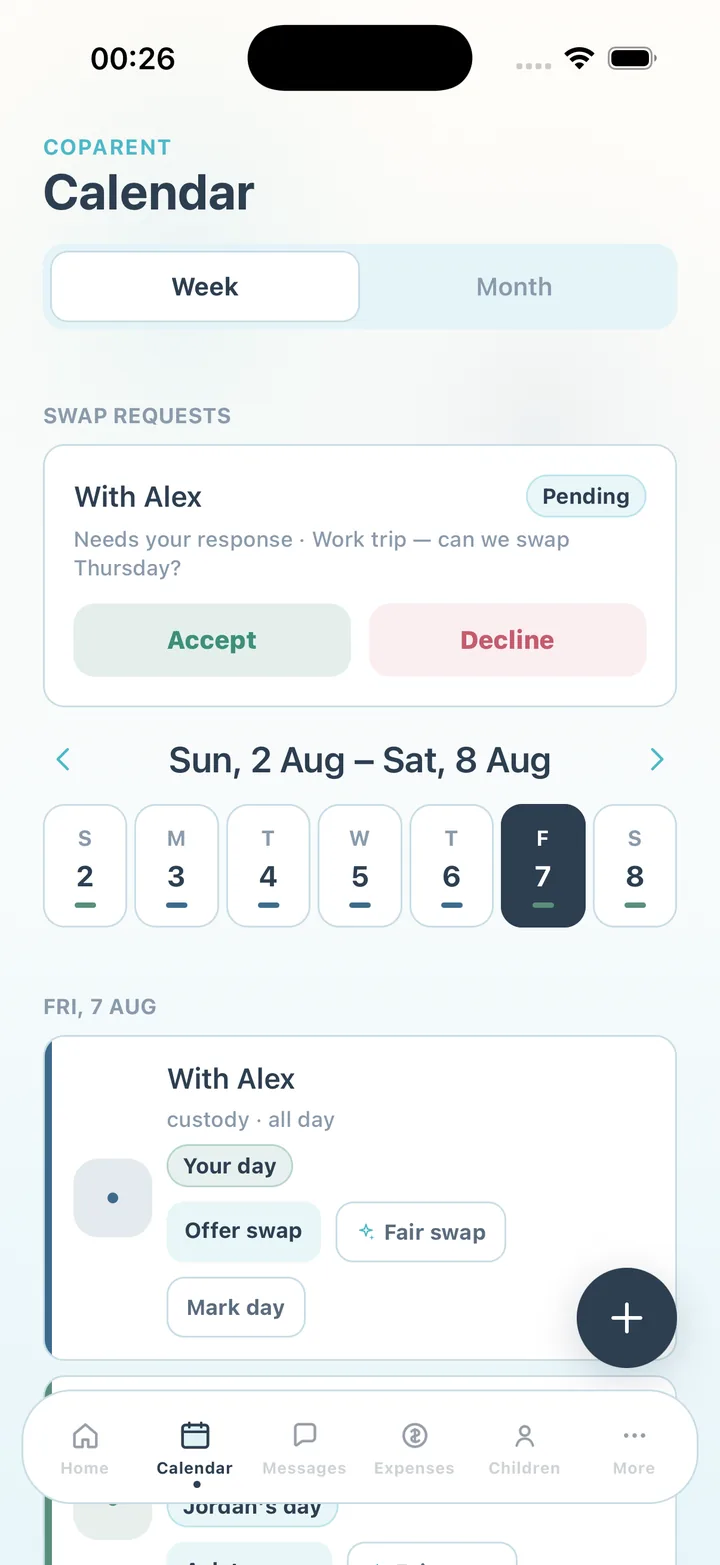
A swap agreed by text gets lost: nobody updates the calendar, and three weeks later the two of you remember it differently. In CoParent a swap is a request attached to the day. The other parent sees it under Swap requests with Accept and Decline buttons. Accept a custody swap and the calendar updates for both of you; decline and nothing changes. Either way, the request, the message and the answer are recorded.
If you are not sure what to offer, the Fair swap suggestion — a Premium feature — looks at the schedule and proposes a balanced trade. The other parent still decides.
If the answer is no
A declined swap is not a verdict on you. Thank them, arrange alternative care for your day, and move on — the record shows you asked. If swaps only ever go one direction, the pattern is visible in the shared activity without anyone having to say it.
This guide describes common arrangements and how to enter them in CoParent. It is not legal advice. Your parenting plan or court order governs your schedule; for anything about the agreement itself, speak with a qualified attorney or mediator.
Steps
Requesting a swap in CoParent takes a few taps, and the other parent answers in one.
- Find the day
Open Calendar and tap the custody day or exchange you need to change. You can swap on either.
- Choose Request swap or Offer swap
Request swap asks for a day that is the other parent's; Offer swap gives one of yours. On Premium, tap Fair swap first for a suggested balanced trade.
- Add a short message
One or two lines: the reason and what you are offering back. If you want a cooler version and you have Premium, write it in the family thread with Rewrite politely first and paste it in.
- Send and wait
The request appears in the other parent's Swap requests as Pending, with Accept and Decline buttons. You will see the status change.
- Confirm the new exchange
If accepted, check the exchange event for the new day — adjust the time or location if the handover changes.
- Mark the day afterwards
After the swapped day, mark the exchange on time, late or missed as usual so the record stays complete.
Frequently asked questions
What happens after I send a request?
It sits as Pending until the other parent taps Accept or Decline — only they can answer it. If your plans change first, say so in the family thread and ask them to decline, so the reason is on the record next to the request.
What if the other parent ignores the request?
It stays pending and visible to both of you. Follow up once in the family thread; the record shows when you asked.
Does an accepted swap change the schedule permanently?
No. It changes the specific days involved. Your regular rotation continues as entered.
CoParent is a coordination tool for parents. It is not legal advice and does not replace a lawyer, mediator or court process.