
Why a co-parenting app instead of texts and a spreadsheet
After a separation, the logistics do not stop: school runs, pickups, dentist appointments, soccer registration, new shoes. When those details live across text threads, a shared calendar that only one of you edits and a note on the fridge, every mismatch turns into a "you never told me". Six months later nobody can prove what was said.
CoParent puts the schedule, the messages, the money and the children's details in one place both parents can see. Nothing needs reconstructing from memory, because the app has the dates.
What is inside
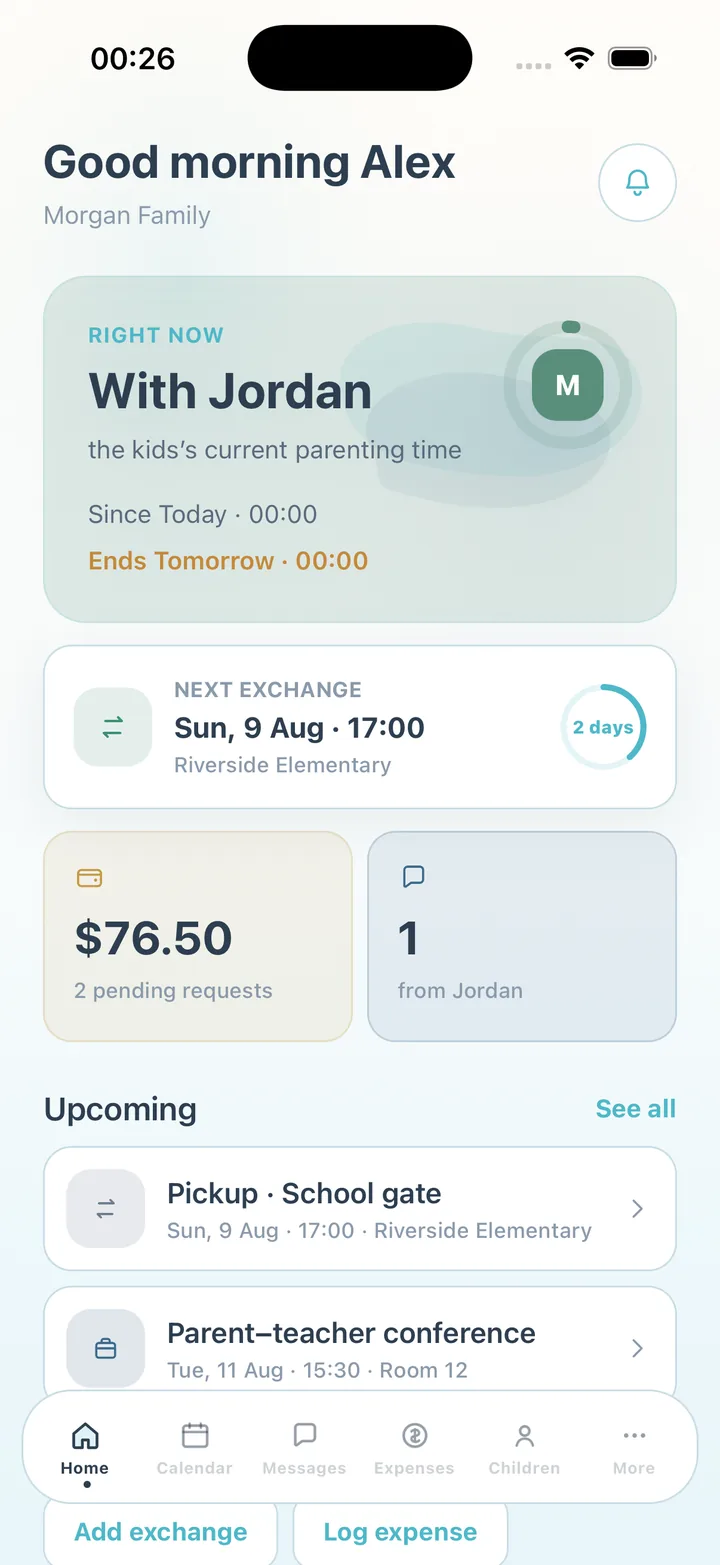
The Home screen answers one question: what do I need to know today? Whose parenting time it is right now, a countdown to the next exchange, pending reimbursements and unread messages, plus quick actions to add an exchange or log an expense.
- Shared custody calendar in week or month view: parenting time, exchanges, school, medical and sports events
- Swap requests the other parent accepts or declines in one tap, with a fair-swap suggestion on Premium
- Attendance notes when a handover is late or missed
- One family message thread with read receipts, replies, attachments, pinned messages and search
- An optional rewrite (Premium) that suggests a calmer version of your message before you send it
- Shared expenses: log a cost, split it 50/50, attach the receipt, mark it paid or half paid
- Child profiles: school, teachers, doctors, dentist, allergies, medications, insurance, sizes, emergency contacts
- Export of everything already shared as a chronological CSV or PDF, for your own records
How two parents get started
One parent creates the family and adds the children. The app shows an invite code; the other parent enters it after installing CoParent and both accounts see the same calendar, thread, expenses and profiles. You can start alone and invite the other parent when you are ready — the record is useful even before they join.
Free for both parents
Both parents can use CoParent free: the calendar, swaps, attendance, messages, expenses and profiles for up to two children. Premium adds unlimited history, more child profiles, CSV and PDF exports, attachments and the AI features — the calmer rewrite, thread summaries and fair-swap suggestions. Premium is a monthly or yearly subscription managed in your Apple ID or Google Play settings.
CoParent is a coordination tool. It is not legal advice, not therapy and not a court tool, and it does not replace a lawyer, mediator or court process.
Frequently asked questions
Do both parents need to pay?
No. Both parents can use CoParent free. Premium is optional and adds unlimited history, exports, attachments, more child profiles and the AI features.
What if the other parent refuses to use the app?
You can still keep your own calendar, expenses and child profiles in CoParent and invite them later. The shared record only becomes shared once they join with the invite code.
Is it only for divorced parents?
It is for any two households raising the same children: divorced, separated, never married, or living apart for other reasons.
Does CoParent give legal advice?
No. It helps you coordinate day to day and keep a record for yourself. For custody agreements or court questions, speak with a qualified attorney.
CoParent is a coordination tool for parents. It is not legal advice and does not replace a lawyer, mediator or court process.