
Agree what counts before the first receipt
Most disputes are about whether a cost should have been shared at all, not about the amount. Decide together, ideally in writing, which categories are shared — medical, school, clothing, activities are typical — and whether there is a threshold below which nobody bothers. Agree how quickly reimbursements are due, and that a receipt goes with every shared cost.
If your parenting plan or a child-support arrangement already covers some of this, follow it. CoParent does not calculate child support and does not give legal or financial advice.
Log it once, where both can see it
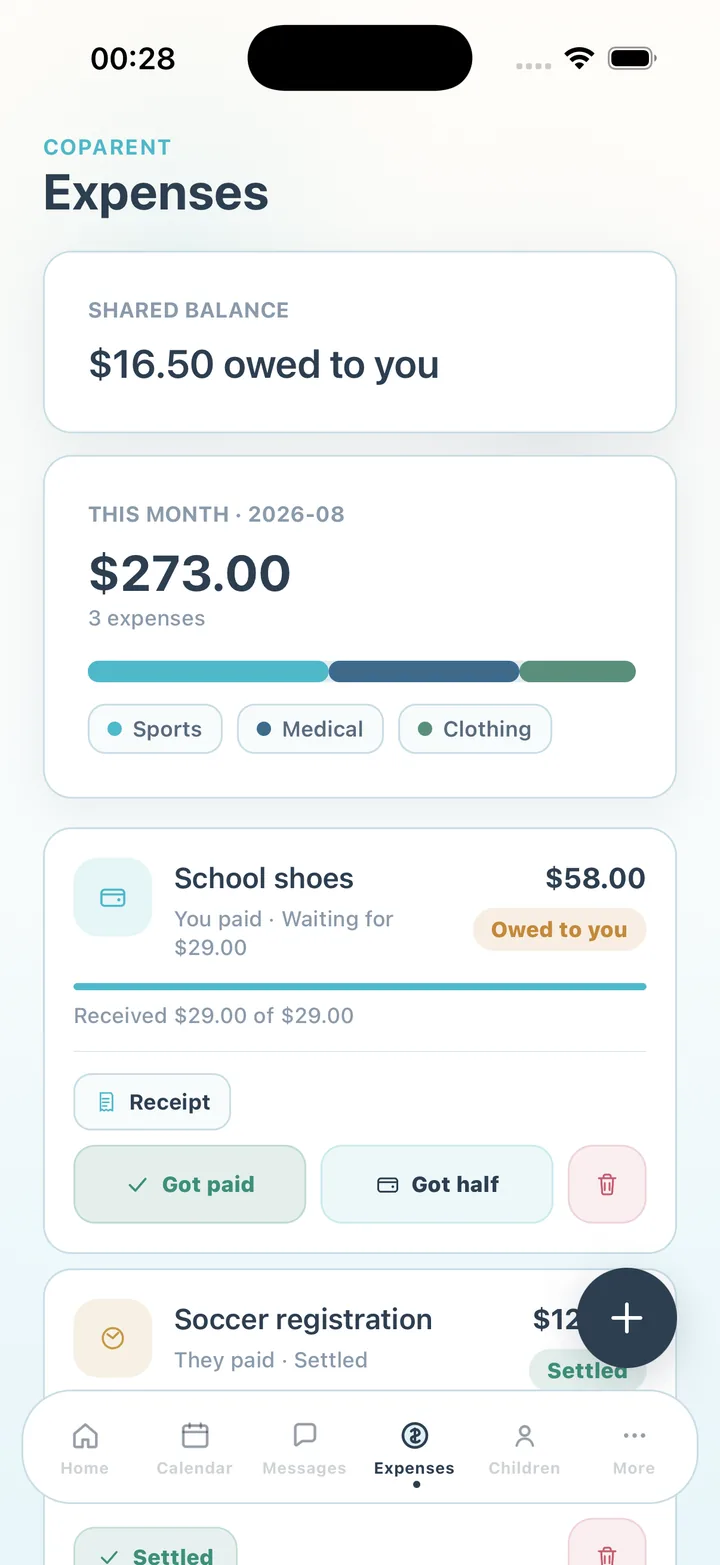
The habit that makes this work is logging the cost the day it happens, with the receipt. In CoParent each expense has a title, an amount, a category, who paid and a 50/50 split; the app shows your share and what the other parent owes before you save. Receipts attach to the entry itself, so they are never lost in a camera roll.
- Categories: medical, education, food, sports, clothing, transportation, activities, insurance or custom
- Monthly recurring costs entered once — lessons, insurance premiums
- Partial payments recorded against the entry: Got half, then Got paid
- Pending reimbursements surfaced on the Home screen so nothing is forgotten
Settle from the balance, not from memory
The Expenses screen opens with the shared balance — who owes whom and how much — and this month's total by category. Pick a rhythm, such as the last weekend of the month, and settle the balance however you already pay each other. Mark entries paid as the money arrives. Because both parents see the same balance, there is no reconciling two lists.
Keep the record
Every logged cost, receipt and settlement becomes part of the family's shared activity. Premium adds unlimited history and attachments and lets you export the chronological record — expenses alongside messages, calendar, swaps and attendance — as a CSV or PDF for your own records. The export is not a legal document, and CoParent does not give legal advice.
Steps
- Agree the shared categories
Decide together which costs are split and when reimbursements are due. Pin the agreement in the family thread so it is easy to find.
- Log the cost the day it happens
Expenses → +. Enter the title and amount, pick the category and who paid. The 50/50 split shows your share and the other parent's.
- Attach the receipt
Add the receipt image to the entry. It stays with the expense for both parents to see.
- Set recurring costs once
For monthly items such as lessons or insurance, choose monthly recurrence so the entry returns each month.
- Settle monthly from the balance
On your chosen day, look at the shared balance and pay the difference however you normally do.
- Mark entries paid
Tap Got paid, or Got half for a partial payment. Settled entries stay in the history.
Frequently asked questions
We do not split 50/50. Can we still use it?
The app splits 50/50 in the current version. For another ratio, log the amount the other parent owes as the shared portion and note the arrangement in the entry.
What if the other parent disputes a cost?
The entry shows the amount, the receipt and who paid, so the discussion starts from facts. Use the family thread — with the calmer rewrite on Premium if needed — to resolve it, and mark the entry once agreed.
Does CoParent handle payments?
No. It records what was spent and reimbursed; payments happen through whatever you already use.
CoParent is a coordination tool for parents. It is not legal advice and does not replace a lawyer, mediator or court process.